About Open MobileUI
Open MobileUI is a professional mobile client for Open WebUI, built to give you convenient access to your self-hosted AI assistant on mobile devices. It delivers a smooth, modern, mobile-first experience with native...
Open MobileUI is a professional mobile client for Open WebUI, built to give you convenient access to your self-hosted AI assistant on mobile devices. It delivers a smooth, modern, mobile-first experience with native performance and smart synchronization. Designed for productivity on the go, Open MobileUI helps individuals and teams stay connected to their AI workflows from anywhere. Whether you need quick answers, mobile access to your company AI assistant, or a privacy-focused self-hosted solution, Open MobileUI is built for flexibility and control. Key features: Native performance with smooth animations and responsive touch interactions Clean, intuitive interface designed for mobile-first workflows Automatic synchronization with your Open WebUI instance Image uploads, file attachments, and rich media support System-aware dark mode Intelligent keyboard handling and input optimization Why choose Open MobileUI: Optimized native rendering for a faster and smoother mobile experience Mobile-first design tailored for touch interactions and gestures Secure credential storage and strong authentication support Reliable behavior when connectivity is limited Professional architecture built for stability and maintainability Privacy: Open MobileUI is designed with privacy in mind. Your conversations and data remain on your self-hosted Open WebUI instance. The app does not operate backend services that receive, store, or process your chat content. Open MobileUI brings the power of Open WebUI to a polished mobile experience built for speed, convenience, and privacy.
Version History You can now sign in with GitHub if your Open WebUI server has it enabled. On iOS, the app also connects again to servers that use plain HTTP with a domain name. 1.16.1 5d ago This release makes it easier to give the assistant context: reference an earlier chat from a message, set a custom system prompt per chat, attach specific files to a folder, and sign in with Microsoft. The tools menu has been redesigned with search for quicker access. 1.15.1 Oct 1 In new release, you can attach web pages directly in chat and get clearer visibility into tool calls and their results in responses. We've also made signing in easier and ensured compatibility with the latest Open WebUI backend. 1.14.1 Sep 25 This version adds full Romanian localization and support for Attach Knowledge — you can now attach knowledge collections to a message to give your AI assistant the context it needs. 1.13.1 Sep 18 This release focuses on stability and privacy improvements. We fixed several bugs and refined how the app handles diagnostic data to keep your experience smooth and secure. 1.12.1 Sep 12 • Support for Open WebUI 0.11.3 • Use MCP tools directly from the chat input • Add your email when reporting a bug so we can follow up • Fixes for stopping a response and chat title generation 1.12.0 Sep 11 • Support for Open WebUI 0.11.1 API • Folder sharing Share a folder with other users, manage who has access, and open folders that were shared with you — chats inside shared folders are now visible to everyone with access. 1.11.0 Sep 7 - Support for Open WebUI 0.11.1 - Experimental tool permissions — the assistant asks before running a tool - The assistant can ask you a clarifying question right in the chat 1.10.0 Sep 2 We've added a brand-new Settings screen with more ways to personalize the app: - Choose your preferred language - Edit and update your profile details - Send us feedback directly — including photos and videos - Plus many other new settings and improvements 1.9.0 Aug 30 - Chat improvements - API updated to version 0.11.0 1.8.2 Aug 8 - Sign in with OIDC / SSO - Connecting to a custom Open WebUI server URL (self-hosted instances) 1.8.1 Aug 6 Optimized chat performance and improved app stability. 1.6.5 Jul 21 - Improved app performance - Refined chat experience - Bug fixes and stability improvements 1.6.4 Jul 15 1.0 May 30
Previous Versions
Here you can find the changelog of Open MobileUI since it was posted on our website on 2026-07-09 02:45:10.
The latest version is 1.16.1 and it was updated on 2026-10-13 21:48:16. See below the changes in each version.
Open MobileUI version 1.16.1
Updated At: 2026-10-13
Changes: Version History You can now sign in with GitHub if your Open WebUI server has it enabled. On iOS, the app also connects again to servers that use plain HTTP with a domain name. 1.16.1 5d ago This release makes it easier to give the assistant context: reference an earlier chat from a message, set a custom system prompt per chat, attach specific files to a folder, and sign in with Microsoft. The tools menu has been redesigned with search for quicker access. 1.15.1 Oct 1 In new release, you can attach web pages directly in chat and get clearer visibility into tool calls and their results in responses. We've also made signing in easier and ensured compatibility with the latest Open WebUI backend. 1.14.1 Sep 25 This version adds full Romanian localization and support for Attach Knowledge — you can now attach knowledge collections to a message to give your AI assistant the context it needs. 1.13.1 Sep 18 This release focuses on stability and privacy improvements. We fixed several bugs and refined how the app handles diagnostic data to keep your experience smooth and secure. 1.12.1 Sep 12 • Support for Open WebUI 0.11.3
• Use MCP tools directly from the chat input
• Add your email when reporting a bug so we can follow up
• Fixes for stopping a response and chat title generation 1.12.0 Sep 11 • Support for Open WebUI 0.11.1 API
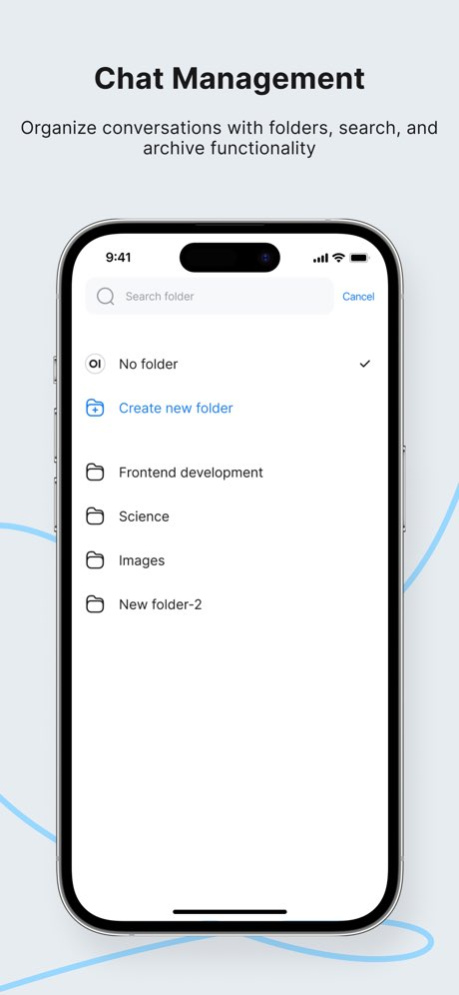
• Folder sharing
Share a folder with other users, manage who has access, and open folders
that were shared with you — chats inside shared folders are now visible
to everyone with access. 1.11.0 Sep 7 - Support for Open WebUI 0.11.1
- Experimental tool permissions — the assistant asks before running a tool
- The assistant can ask you a clarifying question right in the chat 1.10.0 Sep 2 We've added a brand-new Settings screen with more ways to personalize the app:
- Choose your preferred language
- Edit and update your profile details
- Send us feedback directly — including photos and videos
- Plus many other new settings and improvements 1.9.0 Aug 30 - Chat improvements
- API updated to version 0.11.0 1.8.2 Aug 8 - Sign in with OIDC / SSO
- Connecting to a custom Open WebUI server URL (self-hosted instances) 1.8.1 Aug 6 Optimized chat performance and improved app stability. 1.6.5 Jul 21 - Improved app performance
- Refined chat experience
- Bug fixes and stability improvements 1.6.4 Jul 15 1.0 May 30
Open MobileUI version 1.15.1
Updated At: 2026-10-06
Changes: Version History This release makes it easier to give the assistant context: reference an earlier chat from a message, set a custom system prompt per chat, attach specific files to a folder, and sign in with Microsoft. The tools menu has been redesigned with search for quicker access. 1.15.1 5d ago In new release, you can attach web pages directly in chat and get clearer visibility into tool calls and their results in responses. We've also made signing in easier and ensured compatibility with the latest Open WebUI backend. 1.14.1 Sep 25 This version adds full Romanian localization and support for Attach Knowledge — you can now attach knowledge collections to a message to give your AI assistant the context it needs. 1.13.1 Sep 18 This release focuses on stability and privacy improvements. We fixed several bugs and refined how the app handles diagnostic data to keep your experience smooth and secure. 1.12.1 Sep 12 • Support for Open WebUI 0.11.3
• Use MCP tools directly from the chat input
• Add your email when reporting a bug so we can follow up
• Fixes for stopping a response and chat title generation 1.12.0 Sep 11 • Support for Open WebUI 0.11.1 API
• Folder sharing
Share a folder with other users, manage who has access, and open folders
that were shared with you — chats inside shared folders are now visible
to everyone with access. 1.11.0 Sep 7 - Support for Open WebUI 0.11.1
- Experimental tool permissions — the assistant asks before running a tool
- The assistant can ask you a clarifying question right in the chat 1.10.0 Sep 2 We've added a brand-new Settings screen with more ways to personalize the app:
- Choose your preferred language
- Edit and update your profile details
- Send us feedback directly — including photos and videos
- Plus many other new settings and improvements 1.9.0 Aug 30 - Chat improvements
- API updated to version 0.11.0 1.8.2 Aug 8 - Sign in with OIDC / SSO
- Connecting to a custom Open WebUI server URL (self-hosted instances) 1.8.1 Aug 6 Optimized chat performance and improved app stability. 1.6.5 Jul 21 - Improved app performance
- Refined chat experience
- Bug fixes and stability improvements 1.6.4 Jul 15 1.0 May 30
Open MobileUI version 1.15.1
Updated At: 2026-10-02
Changes: Version History This release makes it easier to give the assistant context: reference an earlier chat from a message, set a custom system prompt per chat, attach specific files to a folder, and sign in with Microsoft. The tools menu has been redesigned with search for quicker access. 1.15.1 1d ago In new release, you can attach web pages directly in chat and get clearer visibility into tool calls and their results in responses. We've also made signing in easier and ensured compatibility with the latest Open WebUI backend. 1.14.1 6d ago This version adds full Romanian localization and support for Attach Knowledge — you can now attach knowledge collections to a message to give your AI assistant the context it needs. 1.13.1 Sep 18 This release focuses on stability and privacy improvements. We fixed several bugs and refined how the app handles diagnostic data to keep your experience smooth and secure. 1.12.1 Sep 12 • Support for Open WebUI 0.11.3
• Use MCP tools directly from the chat input
• Add your email when reporting a bug so we can follow up
• Fixes for stopping a response and chat title generation 1.12.0 Sep 11 • Support for Open WebUI 0.11.1 API
• Folder sharing
Share a folder with other users, manage who has access, and open folders
that were shared with you — chats inside shared folders are now visible
to everyone with access. 1.11.0 Sep 7 - Support for Open WebUI 0.11.1
- Experimental tool permissions — the assistant asks before running a tool
- The assistant can ask you a clarifying question right in the chat 1.10.0 Sep 2 We've added a brand-new Settings screen with more ways to personalize the app:
- Choose your preferred language
- Edit and update your profile details
- Send us feedback directly — including photos and videos
- Plus many other new settings and improvements 1.9.0 Aug 30 - Chat improvements
- API updated to version 0.11.0 1.8.2 Aug 8 - Sign in with OIDC / SSO
- Connecting to a custom Open WebUI server URL (self-hosted instances) 1.8.1 Aug 6 Optimized chat performance and improved app stability. 1.6.5 Jul 21 - Improved app performance
- Refined chat experience
- Bug fixes and stability improvements 1.6.4 Jul 15 1.0 May 30
Open MobileUI version 1.13.1
Updated At: 2026-09-25
Changes: Version History This version adds full Romanian localization and support for Attach Knowledge — you can now attach knowledge collections to a message to give your AI assistant the context it needs. 1.13.1 6d ago This release focuses on stability and privacy improvements. We fixed several bugs and refined how the app handles diagnostic data to keep your experience smooth and secure. 1.12.1 Sep 12 • Support for Open WebUI 0.11.3
• Use MCP tools directly from the chat input
• Add your email when reporting a bug so we can follow up
• Fixes for stopping a response and chat title generation 1.12.0 Sep 11 • Support for Open WebUI 0.11.1 API
• Folder sharing
Share a folder with other users, manage who has access, and open folders
that were shared with you — chats inside shared folders are now visible
to everyone with access. 1.11.0 Sep 7 - Support for Open WebUI 0.11.1
- Experimental tool permissions — the assistant asks before running a tool
- The assistant can ask you a clarifying question right in the chat 1.10.0 Sep 2 We've added a brand-new Settings screen with more ways to personalize the app:
- Choose your preferred language
- Edit and update your profile details
- Send us feedback directly — including photos and videos
- Plus many other new settings and improvements 1.9.0 Aug 30 - Chat improvements
- API updated to version 0.11.0 1.8.2 Aug 8 - Sign in with OIDC / SSO
- Connecting to a custom Open WebUI server URL (self-hosted instances) 1.8.1 Aug 6 Optimized chat performance and improved app stability. 1.6.5 Jul 21 - Improved app performance
- Refined chat experience
- Bug fixes and stability improvements 1.6.4 Jul 15 1.0 May 30
Open MobileUI version 1.12.1
Updated At: 2026-09-18
Changes: Version History This release focuses on stability and privacy improvements. We fixed several bugs and refined how the app handles diagnostic data to keep your experience smooth and secure. 1.12.1 6d ago • Support for Open WebUI 0.11.3
• Use MCP tools directly from the chat input
• Add your email when reporting a bug so we can follow up
• Fixes for stopping a response and chat title generation 1.12.0 6d ago • Support for Open WebUI 0.11.1 API
• Folder sharing
Share a folder with other users, manage who has access, and open folders
that were shared with you — chats inside shared folders are now visible
to everyone with access. 1.11.0 Sep 7 - Support for Open WebUI 0.11.1
- Experimental tool permissions — the assistant asks before running a tool
- The assistant can ask you a clarifying question right in the chat 1.10.0 Sep 2 We've added a brand-new Settings screen with more ways to personalize the app:
- Choose your preferred language
- Edit and update your profile details
- Send us feedback directly — including photos and videos
- Plus many other new settings and improvements 1.9.0 Aug 30 - Chat improvements
- API updated to version 0.11.0 1.8.2 Aug 8 - Sign in with OIDC / SSO
- Connecting to a custom Open WebUI server URL (self-hosted instances) 1.8.1 Aug 6 Optimized chat performance and improved app stability. 1.6.5 Jul 21 - Improved app performance
- Refined chat experience
- Bug fixes and stability improvements 1.6.4 Jul 15 1.0 May 30
Open MobileUI version 1.11.0
Updated At: 2026-09-11
Changes: Version History • Support for Open WebUI 0.11.1 API
• Folder sharing
Share a folder with other users, manage who has access, and open folders
that were shared with you — chats inside shared folders are now visible
to everyone with access. 1.11.0 3d ago - Support for Open WebUI 0.11.1
- Experimental tool permissions — the assistant asks before running a tool
- The assistant can ask you a clarifying question right in the chat 1.10.0 Sep 2 We've added a brand-new Settings screen with more ways to personalize the app:
- Choose your preferred language
- Edit and update your profile details
- Send us feedback directly — including photos and videos
- Plus many other new settings and improvements 1.9.0 Aug 30 - Chat improvements
- API updated to version 0.11.0 1.8.2 Aug 8 - Sign in with OIDC / SSO
- Connecting to a custom Open WebUI server URL (self-hosted instances) 1.8.1 Aug 6 Optimized chat performance and improved app stability. 1.6.5 Jul 21 - Improved app performance
- Refined chat experience
- Bug fixes and stability improvements 1.6.4 Jul 15 1.0 May 30
Open MobileUI version 1.10.0
Updated At: 2026-09-04
Changes: Version History - Support for Open WebUI 0.11.1
- Experimental tool permissions — the assistant asks before running a tool
- The assistant can ask you a clarifying question right in the chat 1.10.0 1d ago We've added a brand-new Settings screen with more ways to personalize the app:
- Choose your preferred language
- Edit and update your profile details
- Send us feedback directly — including photos and videos
- Plus many other new settings and improvements 1.9.0 4d ago - Chat improvements
- API updated to version 0.11.0 1.8.2 Aug 8 - Sign in with OIDC / SSO
- Connecting to a custom Open WebUI server URL (self-hosted instances) 1.8.1 Aug 6 Optimized chat performance and improved app stability. 1.6.5 Jul 21 - Improved app performance
- Refined chat experience
- Bug fixes and stability improvements 1.6.4 Jul 15 1.0 May 30
Open MobileUI version 1.8.2
Updated At: 2026-08-22
Changes: Version History - Chat improvements
- API updated to version 0.11.0 1.8.2 Aug 8 - Sign in with OIDC / SSO
- Connecting to a custom Open WebUI server URL (self-hosted instances) 1.8.1 Aug 6 Optimized chat performance and improved app stability. 1.6.5 Jul 21 - Improved app performance
- Refined chat experience
- Bug fixes and stability improvements 1.6.4 Jul 15 1.0 May 30
Open MobileUI version 1.6.5
Updated At: 2026-07-25
Changes: Version History Optimized chat performance and improved app stability. 1.6.5 4d ago - Improved app performance
- Refined chat experience
- Bug fixes and stability improvements 1.6.4 Jul 15 1.0 May 30
Open MobileUI version -
Updated At: 2026-07-09
Disclaimer
Official App Store Link
We do not host Open MobileUI on our servers. We did not scan it for viruses, adware, spyware or other type of malware. This app is hosted by Apple and passed their terms and conditions to be listed there. We recommend caution when installing it.
The App Store link for Open MobileUI is provided to you by apps112.com without any warranties, representations or guarantees of any kind, so access it at your own risk.
If you have questions regarding this particular app contact the publisher directly. For questions about the functionalities of apps112.com contact us.